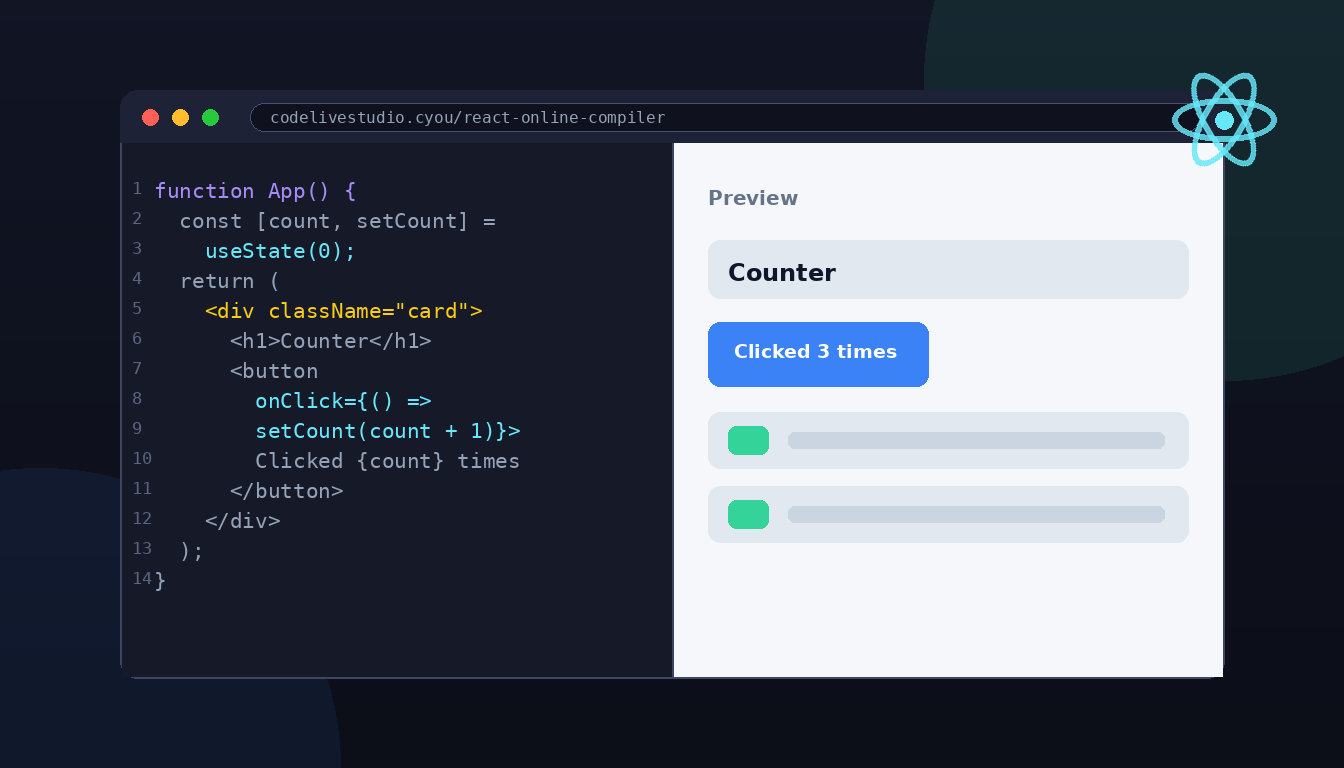
A react online compiler is the fastest way to get real React code running: zero npm install, zero Node, zero project scaffolding. You open a page, type JSX, and the component renders — because React and the Babel compiler are loaded from a CDN and everything executes inside your browser tab. The setup most tutorials make you spend an afternoon on takes about two minutes this way.
This guide covers how browser React compilation actually works, a two-minute first component, useState and useEffect examples you can run as you read, the four errors every beginner hits, and the exact point at which you should switch to a local Vite project. It is written for developers who know basic JavaScript and want to test React ideas on any machine — including locked-down school and office computers where installing tools is not an option.
TL;DR: run React online right now
- Open the CodeLive Studio React compiler, paste the counter component from this guide, press Run — JSX compiles in your tab and the preview updates in about a second.
- Working in your own HTML file? Add three script tags (React 18.3.1, ReactDOM, Babel standalone) plus one <script type="text/babel"> block — the complete skeleton is two sections down.
- Online compilers are best for learning, prototypes and hook experiments. Switch to create-vite when you need npm packages, routing or server-side rendering — the honest limits are explained below.
Prerequisites
- Any modern browser — Chrome, Edge, Firefox or Safari, on desktop or phone
- Basic JavaScript: variables, functions, arrays and arrow functions
- No prior React knowledge required; nothing to install and no account to create
Run your first React component online (2-minute setup)
The shortest path is a compiler page that already has React wired up. The free React compiler on this site preloads React 18.3.1 and Babel, so you skip straight to the code:
- 1. Open the compiler page and wait a moment for the editor and React to load (one time, then cached).
- 2. Delete the starter code and paste the counter component from the hooks section below.
- 3. Press Run — or just keep typing; the preview re-renders as you edit.
- 4. Change the starting count or the label text and watch the preview react.
- 5. Open the console panel next to the preview to see React warnings and console.log output.
Prefer to understand the machinery? Any react js online compiler — including a plain HTML file on your own machine — runs on the same three-part setup. Save this as index.html and double-click it:
<!-- react online compiler starter: save as index.html, double-click, done -->
<!DOCTYPE html>
<html>
  <head>
    <meta charset="UTF-8" />
    <title>React online compiler demo</title>
  </head>
  <body>
    <div id="root"></div>
    <!-- React 18.3.1: the last version published as UMD script builds -->
    <script src="https://unpkg.com/[email protected]/umd/react.production.min.js" crossorigin></script>
    <script src="https://unpkg.com/[email protected]/umd/react-dom.production.min.js" crossorigin></script>
    <!-- Babel standalone compiles the JSX below into plain JS in the browser -->
    <script src="https://unpkg.com/@babel/standalone/babel.min.js"></script>
    <!-- type="text/babel" marks this block for Babel to transform -->
    <script type="text/babel" data-presets="react">
      const root = ReactDOM.createRoot(document.getElementById("root"));
      root.render(<h1>Hello from React 18, no install needed</h1>);
    </script>
  </body>
</html>Two references worth keeping open while you work: the Babel standalone docs cover every compiler option the script tag accepts, and react.dev is the official hooks reference — bookmark both, they are the only two sources this setup ever needs.
Testing hooks and state online: useState and useEffect examples
Hooks are where a react compiler online really pays off — state logic is exactly the kind of thing you want to poke at without spinning up a project. In a UMD setup there are no imports at all: hooks hang off the global React object. Paste this into the online React playground and click the button:
function Counter() {
  // useState returns [currentValue, setter]; 0 is the initial state
  const [count, setCount] = React.useState(0);
  // every click schedules a re-render with the new count
  return (
    <button onClick={() => setCount(count + 1)}>
      Clicked {count} times
    </button>
  );
}useEffect works the same way and is perfect for testing data fetching before you commit to it:
function UserList() {
  // users starts empty; setUsers fills it when the fetch resolves
  const [users, setUsers] = React.useState([]);
  // the empty array [] means: run once, after the first render
  React.useEffect(() => {
    fetch("https://jsonplaceholder.typicode.com/users")
      .then((res) => res.json())
      .then((data) => setUsers(data));
  }, []);
  // keys tell React which list items changed between renders
  return <ul>{users.map((u) => <li key={u.id}>{u.name}</li>)}</ul>;
}Common React compiler errors and the exact fixes
These four cover almost every blank screen and console complaint you will hit in a browser React setup. Each one is a real message, copied from a real console.
Error 1: "Uncaught ReferenceError: ReactDOM is not defined" — your text/babel block ran before React finished loading, usually because a CDN tag sits below it or was dropped:
<!-- WRONG: the Babel block loads first, React is not there yet -->
<script type="text/babel">
  root.render(<App />);
</script>
<script src="https://unpkg.com/[email protected]/umd/react.production.min.js"></script>

<!-- RIGHT: React and ReactDOM first, Babel second, your code last -->
<script src="https://unpkg.com/[email protected]/umd/react.production.min.js"></script>
<script src="https://unpkg.com/[email protected]/umd/react-dom.production.min.js"></script>
<script src="https://unpkg.com/@babel/standalone/babel.min.js"></script>
<script type="text/babel">
  root.render(<App />);
</script>
Error 2: "Expected corresponding JSX closing tag for <img>. (6:4)" — a Babel SyntaxError. JSX is stricter than HTML: void elements must self-close:
// WRONG: Babel aborts the whole script with a SyntaxError
<img src="logo.png">

// RIGHT: self-close every void element in JSX
<img src="logo.png" />
Error 3: "Warning: Invalid DOM property `class`. Did you mean `className`?" — the page still renders, but the styling silently does not apply. JSX uses camelCase DOM property names:
// WRONG: React warns and the CSS class never reaches the DOM
<div class="card">...</div>

// RIGHT: className is the JSX spelling of the class attribute
<div className="card">...</div>
Error 4: "Target container is not a DOM element." — createRoot cannot find your mount point. The id in getElementById must match a real <div> above the scripts exactly; a typo like id="rooot" produces this error even though the markup looks fine. Fix the id, keep the root div above every script tag, and the error disappears.
Limits of browser React: npm, SSR and build steps explained
Honest limits first, because every thin 'online react playground' listicle skips them and leaves you debugging a wall an hour later. npm packages are the big one: a UMD-based compiler loads script tags, not packages, so anything that expects an import from the npm registry will not work. Libraries that publish standalone UMD builds can be added as extra script tags, but the modern ecosystem increasingly does not ship them.
Versions matter here too: React 19 removed UMD builds entirely, so the three-script setup above pins you to React 18.3.1 — the final 18.x release, still fully supported for this exact use case. Trying React 19 in a browser requires ES module imports from a CDN such as esm.sh, which is a different setup than any UMD-based compiler uses.
The smaller limits: there is no server-side rendering in a browser tab, so SSR-specific behavior cannot be tested; Babel standalone is a heavyweight script (about 3 MB minified, cached after first load) that compiles on every page refresh; and browser auto-save is no substitute for git. For plain JavaScript experiments that do not need JSX at all, the JavaScript playground is a lighter tool for the same tab.
React online compiler vs create-vite locally: when to switch
The two are complements, not competitors — here is the honest comparison and the exact moment to migrate. The rule of thumb: the day you type npm install, graduate to Vite.
| React online compiler | create-vite locally | |
|---|---|---|
| Setup | Open a page — zero install | Node 20+ required, one command |
| JSX compilation | Babel standalone, in the tab | Vite + esbuild, instant HMR |
| npm packages | UMD script tags only | Any package on the registry |
| React version | React 18.3.1 (UMD era) | React 19.x current |
| Version control | Browser auto-save / share links | Full git workflow |
| Best for | Learning, quick tests, locked-down machines | Real projects, teams, deployment |
When you do switch, the command is one line and the project structure maps one-to-one to what you learned online:
# creates my-app/ with the current React template, needs Node 20+
npm create vite@latest my-app -- --template react

cd my-app && npm install && npm run dev
Quick reference summary
| Task | What to do |
|---|---|
| Run JSX with zero install | Use a React online compiler (this site preloads React 18.3.1 + Babel) |
| Set up React in your own HTML | Two UMD tags + @babel/standalone + one <script type="text/babel"> block |
| Add state | React.useState(0) — no import in UMD setups |
| Run an effect once | React.useEffect(fn, []) — empty dependency array |
| Try React 19 in a browser | ESM imports via esm.sh (React 19 dropped UMD builds) |
| Move to real development | npm create vite@latest my-app -- --template react |
Is a React online compiler good enough for real projects?
For learning, interviews, prototypes and bug reproduction — yes, genuinely. For a production app, no: real projects need npm dependencies, git history, tests and a build pipeline, none of which a browser tab provides. The r/reactjs community consensus matches this split: playgrounds for experimenting, Vite or a framework for anything you will maintain. Compare the playground options in the free CodePen alternatives roundup if you are choosing a long-term home.
How do I use useState and useEffect in an online compiler?
Exactly as shown above, with one difference from project code: in a UMD setup you call React.useState and React.useEffect directly instead of importing them. Skip the import line entirely. The rules of hooks still apply — call them at the top level of a component, never inside conditions or loops — and the compiler will enforce them the same way a local project does.
Why does my React code show a blank screen in the browser compiler?
Three causes, in order of likelihood: script tags in the wrong order (fix: React and ReactDOM above the text/babel block), a missing or misspelled root div (fix: match getElementById to a real id), or a Babel SyntaxError that aborted your whole script (fix: open the console — the exact line number is in the error). The blank screen is almost never React failing; it is React never being asked to render.
Can I use npm packages in an online React compiler?
No — and any tool claiming otherwise is compiling your project on a server. UMD-based compilers load script tags from a CDN, so only libraries that publish standalone UMD builds can be added, one extra tag each. If a tutorial starts with npm install some-package, that lesson needs a local Vite project. Pure-logic packages sometimes have a CDN build you can drop in; anything with build-time integration (component libraries, bundlers) does not.
Do online React compilers save my code?
In browser-based tools like this site's, your code lives in your own browser's storage — nothing is uploaded to a server, and an optional share link is created only when you deliberately press Save. Server-based compilers are the opposite: your code must be sent to their machines to run. That distinction matters most when pasting code that contains API keys or company logic — keep those in browser-side tools or a local project.
Try everything from this article live
The CodeLive Studio editor runs the examples above with a one-second live preview no account, no install.
Open the free editorKeep reading
- Open the React online compiler· The no-setup compiler this guide uses — React 18.3.1, Babel and live preview preloaded.
- JavaScript playground· Testing plain JS logic without JSX? The lighter sibling tool runs it with a captured console.
- 9 best free CodePen alternatives· Choosing a longer-term playground? Eight competitors tested against CodeLive Studio.